Business Basics
Layer 5: Cloud Backup
Cloud Backup
Overview
If MFA, Spam Filtering, and Endpoint Security are about preventing attacks, Cloud Backup is about surviving them. No security system is foolproof and at some point, something will go wrong. Maybe ransomware gets through, a user deletes the wrong file, a system fails or data gets corrupted, either by accident or maliciously. Cloud Backup is your safety net – it ensures you can put things back to how they should be.
Why Cloud Backup is so important
Data Recovery (Fast & Reliable)
- Restores lost, deleted, or corrupted data
- Recovers:
- Emails
- Files
- SharePoint / OneDrive
- Servers
You get your business data back - quickly!
Business Continuity
- Keeps your business running after an incident
- Minimises downtime
- Keeps staff productive
- Protects customer commitments
- Without backup = business stops
- With backup = business continues
Protection from Ransomware
- Without backup: Files are encrypted → pay ransom or lose everything
With backup: Restore clean copies → no ransom payment needed
Attackers rely on desperation. Backups remove their leverage entirely.
Version Control
- Restore previous versions of files
- Undo mistakes or corruption
Offsite Protection
- Data is stored in secure cloud environments
- Safe from:
- Hardware failure or Server crash
- Theft or tampering
- Fire or physical disaster
Insider Risk
- Threats from malicious or careless staff
- Possible data deletion or tampering
- With backup = accountability + recovery
Accidental Deletion
- Staff deletes a folder or email
- Sync then removes it everywhere!
- Backup restores it instantly
Data Corruption
- Software errors
- Sync issues
- Malware infection changes data
Simply roll back to a known clean state.
Common Misconception
“We use Microsoft 365 / Google Workspace – so we’re already backed up.”
Not true…
- These platforms provide availability, but not full backups
- Offer limited retention and recovery options
- They’re not designed for ransomware or deliberate deletion recovery
You still need an independent, properly configured cloud backup system
Real-World Scenario
Without cloud backup:
- You’re hit with ransomware
- All your files are encrypted
- You have NO recovery option
- Business is stopped in its tracks
- Either pay the ransom, rebuild or shut down
Typical Impact:
- Financial loss that no one anticipated
- Business downtime
- Loss of reputation
- Major data loss events often lead to business failure. Rebuilding is just too hard!
Security reduces the chance of an incident. Backup determines whether you survive one.
Risk Reduction
Cloud backup is about impact reduction, not prevention. It’s your last line of defence.
A properly configured backup system will reduce your data loss risk to near zero. It massively reduces business downtime and removes the potential financial impact of a ransomware attack.
We hope you never have to use it… but you absolutely do need it!
Take Action
Cyber attacks are no longer a matter of if, but when.
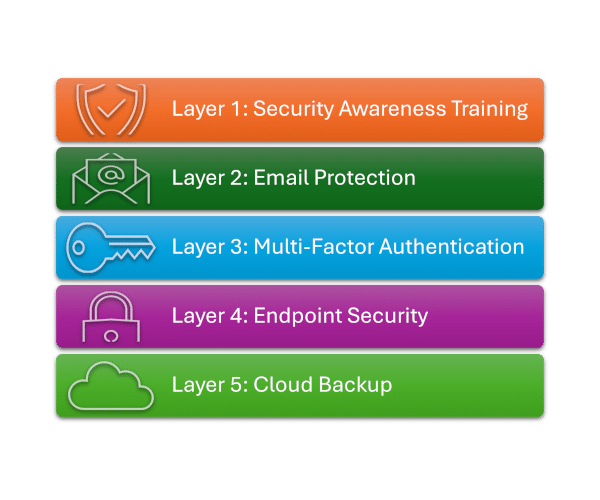
This 5-layer model provides practical, proven protection for small and growing businesses.